Print Formats
NijiCAD v1.0.2
Prints to PDF, SVG, and PNG based on printing settings. Line weights and colors are determined by color-dependent styles.
- The desktop version saves files locally via a file selection dialog.
- The web version saves files via download.
1. PDF Printing Overview
Outputs PDF files.
- Processing is performed on the frontend.
Paper Size
- Sizes: A1 to A6, L size, Postcard.
- B sizes will be added in the future (to avoid clutter).
- Orientation: Portrait, Landscape.
- Margins: To be implemented in the future.
Area Specification
- Specify the bottom-left corner of the paper.
- Specify the rotation angle.
- Specify the scale.
Plot Style
- Color-dependent style.
- Styles in the initial version are all fixed values.
Printing Specifications
- Shapes are embedded as vectors.
- Text is embedded.
- Images are embedded.
- Text is adjusted to match the CAD drawing positions.
- Fonts are subsetted.
1a. PDF Printing Test
Conducted by visual comparison between the CAD screen and a PDF viewer.
- Presence of shapes.
- Reflection of shape colors.
- Linetypes and line weights.
- Reflection of transparency.
| Item | NijiCAD | Autodesk DWG TrueView |
|---|---|---|
| Line Ends | Round | Round |
| Miter Limit | 10 | 10 |
| Arc Smoothing | Path curve | Path curve |
| Spline Smoothing | Continuous line | Continuous line |
| Text Status | Embedded | Embedded |
DXF for PDF Linetype Comparison
A comparison is made between NijiCAD and DWG TrueView using the same printing settings.
⬇️ Download DXF for Verification: DXF
PDF Printing with NijiCAD
Performed using default settings from the print panel (A4 Portrait, Scale = 1/1).
⬇️ Download Printing Result: NijiCAD Printed PDF
PDF Printing with Autodesk DWG TrueView
Performed with equivalent printing settings in DWG TrueView.
- Create a .ctb file with settings equivalent to NijiCAD (Colors 1–7 set to black, line weights configured).
- Set printer to "DWG To PDF.pc3".
- Set paper size to "ISO Full Bleed A4 (210.00 x 297.00 mm)".
- Set plot area to "Window" and specify the corners of the frame.
- Set plot offset to X:0, Y:0, and uncheck "Center the plot".
- Set plot scale to 1:1.
- Set drawing orientation to Portrait.
⬇️ Download Printing Result: DWG TrueView Printed PDF
Comparison Result PDF
A difference comparison is performed using "Hikaku PDF-Fast ver4.0".
- Settings: Common areas in gray, 600dpi, changes after in red, changes before in blue.
- Set NijiCAD Printed PDF as the new file.
- Set DWG TrueView Printed PDF as the old file.
⬇️ Download Comparison Result: Comparison Result PDF
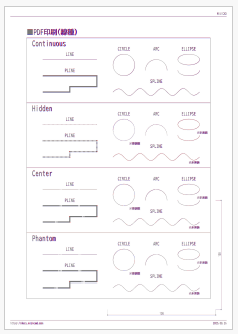
Note: Overall displacement is considered inevitable due to the different CAD engines.
| Section | NijiCAD (Red) | DWG TrueView (Blue) |
|---|---|---|
| LINE Linetype | ⭕ | ⭕ |
| ARC Linetype | ⭕ | ⭕ |
| LWPOLYLINE Linetype | ⭕ | ⭕ |
| CIRCLE Linetype | △ Slight deviation in gaps | ⭕ |
| ELLIPSE, SPLINE Linetype | × To be implemented after CAD drawing support | ⭕ |
Note: Displacement of TEXT shapes occurs due to differences in font display size coefficients between CAD systems.
🛠️ Hikaku PDF-Fast
Software for quickly comparing differences between two PDF files.
👇 Obtain it via the developer of "Hikaku PDF-Fast" for drawings. X: https://x.com/Chiko_root note: https://note.com/chiko_root/n/n88a0fd5d76fa
Importing PDF into Other CAD Software
PDF File Import Verification. Import PDFs printed from the same DXF data into a drawing using the PDFIMPORT command.
| Comparison Item | NijiCAD | DWG TrueView |
|---|---|---|
| Coordinate Error | ⭕ No error | ❌ Approx. 0.0087% error |
| Thick Polylines | △ Polyline (width lost) | △ Represented by polylines and solids |
| Dashed, Dash-dot lines | △ Single line (linetype lost) | △ Split into segments per pen down |
Items marked with △ may have advantages depending on the use case.
Printing on Paper
Conducted by printing the PDF on a home printer.
- Measurement using a triangular scale.
- Measure precision in both vertical and horizontal directions.
- Base measurement of 100mm, with a tolerance of approx. ±0.2mm (0.1%).
- Compare with other CAD software.
Printer Output
- Using a home printer.
| Item | via NijiCAD PDF | via Autodesk DWG TrueView PDF |
|---|---|---|
| Horizontal 100mm | Approx. 100.1mm | Approx. 100.1mm |
| Vertical 100mm | Approx. 99.9mm | Approx. 99.9mm |
Note: Error depends on printer performance.
Evaluation
Regarding shape representation, it meets the performance requirements for practical use. While text shapes are drawn and printed slightly smaller, the deviation is not problematic. This is an intended specification, set to 1.25 times the text size as a coefficient that feels natural while aligning with AutoCAD-style displays. Printed PDF shapes maintain accurate coordinates, providing an advantage when reusing them in other CAD software. However, when inserting as shapes, linetypes and polyline widths are lost, so linetypes may need to be reconfigured depending on the situation. Measurements from paper output via PDF show results equivalent to other software.
2. SVG Printing
Outputs SVG files.
Size
- Primarily actual size (1:1).
- Includes a coefficient to approximate actual size display on screens (approx. 96dpi).
Printing Specifications
- Shapes are embedded as vectors.
- Text is embedded.
- Images are embedded.
- Text fonts are individually specified.
3. PNG Printing
Outputs PNG files.
- Uses results from Canvas rendering during SVG output.
4. Update History
| Date | Content |
|---|---|
| 2025/08/27 | New |