NijiCAD Training Series
The NijiCAD Training Series launched on YouTube on March 23, 2026, and tutorials up to MISSION 11 are available as of May 1, 2026, and regularly updated.
Whether you are a beginner or looking to master advanced features, these step-by-step video tutorials will help you learn how to use NijiCAD systematically.
Using Sample Files
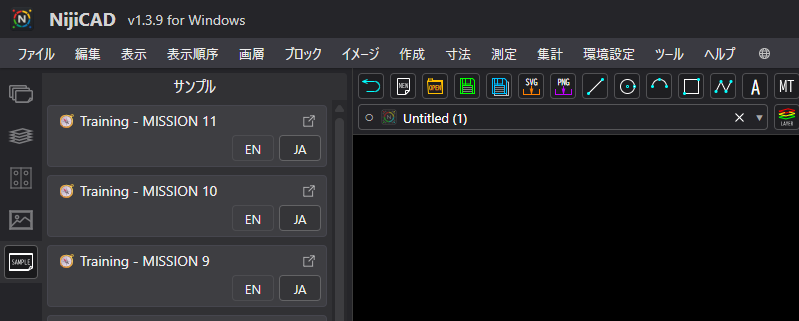
You can directly open the training drawings used in the tutorials from the "Sample Tab" in the left side palette inside the NijiCAD app.
Launch NijiCAD and select the "Sample" tab from the left side palette. Training drawings for each MISSION are ready for you.
Key Points of This Series
- Step-by-step from the basics: Learn everything from basic operations to advanced applications at a comfortable pace.
- Practical drawing exercises: Take on specific challenges (MISSIONs) designed for real-world drawing scenarios.
- Explanation of latest features: Get up to speed quickly with useful new features added in updates.
YouTube Playlist
You can watch the series via the link below or the embedded player.