COUNTBLOCK
Overview
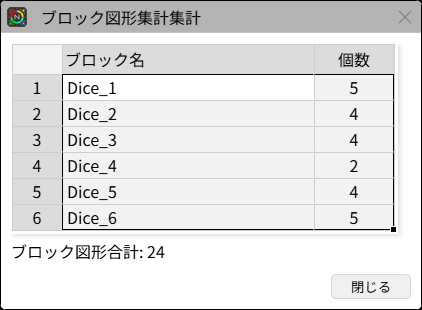
Counts the occurrences of block objects and displays them in a table.
| Select Blocks | Dialog |
|---|---|
 |  |
Prompts
1. Select Objects
Select the block objects.
2. Dialog
You can copy the results to the clipboard as TAB-separated text by pressing Ctrl+C.
Clipboard Content Example:
Dice_1	5
Dice_2	4
Dice_3	4
Dice_4	2
Dice_5	4
Dice_6	5
Operation Flow
Update History
| Date | Content |
|---|---|
| 2025/04/16 | New |