SVGOUT
Overview
Exports selected objects within a specified range as an SVG file. Object colors depend on the print style. The default line width is set to 1. This is ideal for generating assets for web content.
Prompts
Select Objects
Select the objects you want to export.
Specify 1st point of range
Specify the first corner point of the export range.
Specify 2nd point of range
Specify the opposite corner point of the export range.
SVG Output Dialog
A preview and the dimensions of the selected range are displayed.
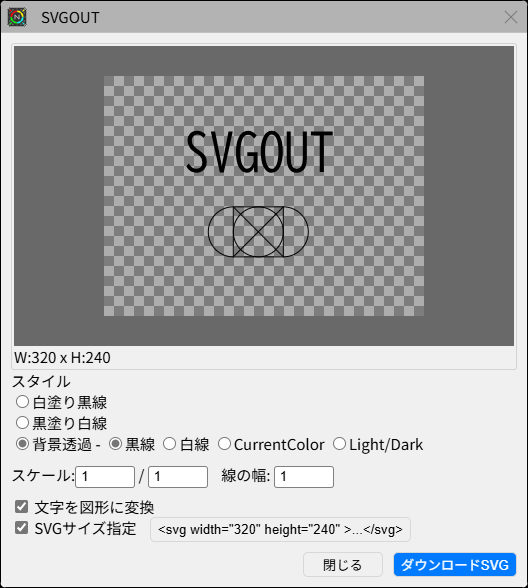
Specify the background color, default line color, and scale. If "Convert text to shapes" is checked, text will be vectorized and embedded. This prevents text displacement even if the destination environment lacks the required fonts, although the text data itself will not be preserved as editable text.
If "Specify SVG size" is checked, width and height attributes will be included in the SVG tag. This is useful when you want to fix the size in the destination display. Clicking the "<svg> Tag" button copies the SVG code to your clipboard. To export to a file, click the OK button.
Operation Flow
Update History
| Date | Content |
|---|---|
| 2025/04/29 | New |